
Data Validation Testing: Techniques, Examples, & Tools

Table of Contents
In This Article:
Data validation testing ensures your data maintains its quality and integrity as it is transformed and moved from its source to its target destination. By applying rules and checks, data validation testing verifies the data meets predefined standards and business requirements to help prevent data quality issues and data downtime.
While this process varies from organization to organization, these unit tests are typically applied by the data engineer after they have built the data pipeline architecture. This is done by:
- Manually writing and scheduling a SQL query;
- Using an automated data profiler like Great Expectations or one within a transformation platform like dbt; or
- Developing custom monitors within a data observability platform
Similar to how there are multiple quality assurance checkpoints as part of the manufacturing process, it is important to implement data validation testing at each stage of the data curation and lifecycle process.
It’s also important to understand the limitations of data validation testing. Like most things, there will be diminishing returns for each new test and new challenges that arise from attempting to execute it at scale.
This guide will walk you through various data validation testing techniques, how to write tests, and the tools that can help you along the way. We’ll also cover some common mistakes we haven’t seen covered anywhere else.
In This Article:
5 critical steps every data validation process needs
We will take a more expansive view of data validation because we believe it’s critical to achieving the objective: ensuring high quality data that meets stakeholders’ expectations. Writing tests that pass isn’t a useful process and of itself, it’s a means to an end.
From this perspective, the data validation process looks a lot like any other DataOps process.
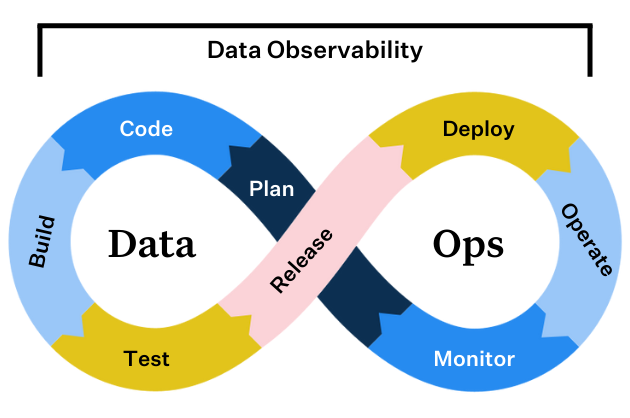
Step 1: Collect requirements
You need to collect requirements before you build or code any part of the data pipeline. Why? If you choose the wrong approach, no number of data validation tests will save you from the perception of poor data quality.
For example, your data consumers might need live data for an operational use case, but you chose to go with batch data ingestion. The data freshness will never meet the requirements, and thus, even if your tests pass the data quality is still poor in the eyes of your stakeholders.
When collecting requirements you will want to cover the basics including: schema, freshness, quality attributes, access, ownership, and more. You should then document this information and even consider creating a data SLA.
Step 2: Build the pipeline
Chances are you are not building a data pipeline entirely from scratch, but rather combining data from new sources with data already in your data warehouse or lakehouse. In these cases it is important to understand data lineage. The reliability of your data product is as strong as its weakest link.
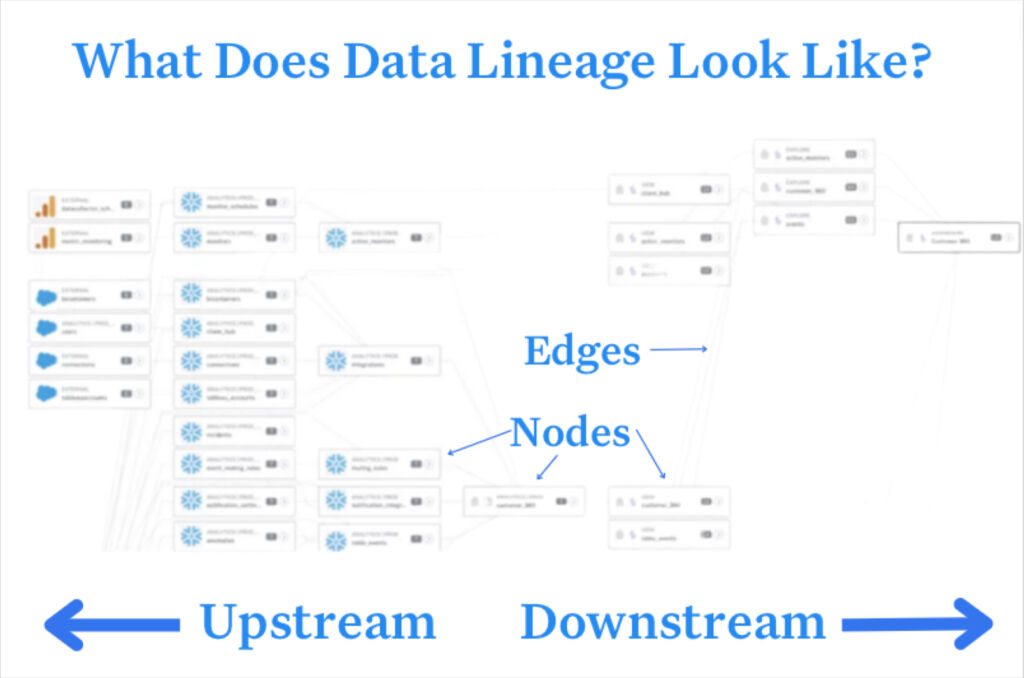
When building the pipeline you will want to consider components beyond data quality including how PII will need to be handled, idempotency, and data optimization.
Step 3: Sample the data, smoke test, data diff
After you’ve developed your data pipeline you’ll want a quick and dirty way to see if you did it correctly. It doesn’t make sense to turn on the spigot if your pipeline will be spewing sewage, nor does it make sense to start applying validation tests that will all noisy fire at once.
Sampling the data involves running the pipeline on a small subset of data to see if there are any easy to spot inconsistencies or errors. A smoke test is a more in-depth process involving synthetic data, and data diff is the process of understanding how code changes impact the number of rows produced in the target table.
Step 4: Write and implement data validation tests
There are many types of data validation tests (more on that in the next section), but you can consider three different types of tests.
- The tests that are common across every data pipeline and help ensure basic functionality and quality. Data engineers should be able to apply these without requiring much input. For example, most (really all) tables should have a primary key, like user_id, which should never have a NULL value. Ensuring schema continuity, perhaps as part of a data contract, would be another common data validation test.
- The tests that are specific to a dataset and reflect business logic or domain expertise that will typically need to be gleaned from a data analyst or business stakeholder. For example, this column represents currency conversion and should never be negative. Or, this column is for transactions in Bitcoin which should be a float rather than integer data type since they are frequently done in fractions of a coin.
- The tests that monitor for drift or data anomalies. For example, order_amount has never exceeded $100 and there is a new value of $150. These types of tests are the most difficult as the thresholds are difficult to determine and will require some historical data to profile against.
Step 5: Continuously improve and deploy
There is always another pipeline to build, so it’s understandable why so many data teams stop the data validation process at the previous stage.
However, data engineers should make it a standard operating procedure to check back in with data consumers to gauge satisfaction levels and surface any additional requirements that should be validated with additional tests.
This is also an excellent time to take a step back and assess your data quality framework as a whole. Our research shows data teams spend up to 30% of their time on data quality related tasks, but issues still make it to business stakeholders “all or most of the time.” This is because writing data validation tests is tedious and only provides coverage for a small subset of issues that can be anticipated.
If your team is experiencing capacity or data trust issues, you will likely want to consider adding data observability and machine learning driven anomaly detection to your data validation approach.
Data observability can also help by surfacing data reliability metrics to your data teams so they can accurately assess if the data set will be a fit for their needs. Your data team can imbue trust in its products within the catalog, just like Amazon.com generates trust by providing key metrics and warranties.
Data validation testing techniques
Let’s dive into common data validation testing techniques. These include:
Data quality starts with validation. Every team needs a solid grasp of both traditional validation methods and the newer practices gaining traction in 2025. Here’s what actually works in production environments.
Range checking
Range checking verifies that numeric values fall within acceptable boundaries. Take an age field. You’d confirm it sits between 0 and 120. This technique catches obvious errors before they corrupt your analysis and is particularly valuable for sensor data, financial figures, and any metric with natural limits.
Type checking
Type checking confirms that data matches its expected format. A date field should contain dates, not random strings or numbers. These checks prevent classic problems like “April 31st” and stop numeric calculations from breaking when someone enters “N/A” in a quantity field.
Format checking
Format validation ensures data follows specific patterns. Email addresses need the @ symbol and a valid domain structure, while phone numbers should match regional formatting rules. Regular expressions handle most format checking efficiently, though balance strictness with flexibility to avoid rejecting valid but unusual entries.
Consistency checking
Consistency checks examine relationships between fields. If a record shows “France” as the country, the city shouldn’t be “Tokyo.” This validation catches human error and integration problems between different data sources, especially when combining datasets from multiple departments.
Uniqueness checking
Uniqueness validation prevents duplicate entries in fields that should be distinct. Customer IDs, email addresses in user tables, and invoice numbers all require uniqueness constraints. Duplicates wreck analytics and create confusion in operations, throwing off calculations and leading to embarrassing double communications.
Existence checking
Existence checks ensure critical fields contain actual values. A transaction record needs an amount, and a customer profile requires at least one contact method. NULL values in essential fields break reports and workflows, so define which fields are truly mandatory versus nice-to-have.
Referential integrity checking
Referential integrity validates connections between related data. Every order must link to an existing customer, and each line item should reference a valid product ID. These checks prevent orphan records that clutter databases and ensure accurate joins in analytical queries.
AI-driven anomaly detection
Machine learning models now spot unusual patterns that rule-based validation misses. Anomaly detection identifies subtle deviations like a normally steady metric suddenly spiking or transactions that technically pass all rules but don’t match typical behavior. Modern anomaly detection adapts to your data’s natural patterns without manual threshold setting, reducing the false positives that plague traditional approaches.
Real-time validation
Real-time validation catches errors at the point of entry rather than during batch processing. Users get immediate feedback when they enter invalid data, and APIs reject malformed requests before they pollute downstream processes. This approach dramatically reduces cleanup work and builds user trust since people fix their own mistakes immediately.
How to write data testing validation tests
Data validation testing can be done in various ways depending on the tools, languages, and frameworks you’re using.
Example data validation test in Excel
For smaller datasets, you can use spreadsheets like Excel or Google Sheets to perform basic data validation tests. Both allow you to define validation rules for your data and highlight cells that don’t meet these rules.
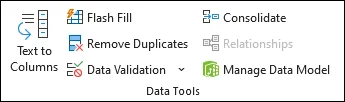
Let’s say you only wanted decimal values in a certain column. In Excel you can select the field, select data validation under the data tab, select the decimal option under Allow.
Example data validation test in SQL
If your data resides in a relational database (warehouse or lakehouse), you can write SQL queries to perform data validation tests. For example, you can use SQL queries to check for data freshness.
For example, let’s assume you are using Snowflake as your data warehouse and have integrated with Notification Services. You could schedule the following query as a Snowflake task which would alert you Monday through Friday at 8:00am EST when no rows had been added to “your_table” once you have specified the “date_column” with a column that contains the timestamp when the row was added.
CREATE TASK your_task_name

  WAREHOUSE = your_warehouse_name

  SCHEDULE = 'USING CRON 0 8 * * 1-5 America/New_York'

  TIMESTAMP_INPUT_FORMAT = 'YYYY-MM-DD HH24:MI:SS'

AS

SELECT

  CASE WHEN COUNT(*) = 0 THEN

    SYSTEM$SEND_SNS_MESSAGE(

      'your_integration_name',

      'your_sns_topic_arn',

      'No rows added in more than one day in your_table!'

    )

  ELSE

    'Rows added within the last day.'

  END AS alert_message

FROM your_table

WHERE date_column < DATEADD(DAY, -1, CURRENT_DATE());
Many data observability platforms, like Monte Carlo, allow you to deploy custom monitors (basically validation tests) with a SQL statement as well.
Example data validation test with dbt
ETL tools often include data validation features. You can define validation rules that the data must meet before it’s loaded into the target system.
dbt is a popular open-source transformation tool that can be used for data testing. There are four standard tests you can use out-of-the-box with dbt. These include: not NULL, unique, accepted values, and relationships.
Here’s an example of how you might write a test in dbt:
In dbt, tests are defined in a YAML file. Let’s say you have a table named users and you want to test the uniqueness of the user_id field and also check that the age field is never negative. You would define these tests in your schema.yml file like this:
version: 2

models:

  - name: users

    columns:

      - name: user_id

        tests:

          - unique

          - not_null

      - name: age

        tests:

          - name: accepted_values

            config:

              values: ['>= 0']
In this example, the unique and not_null tests are built-in dbt tests. The accepted_values test is a custom test that checks if the age field is greater than or equal to 0.
To run the tests, you would use the dbt command line: dbt test.
This command will run all tests defined in your project and output the results. If a test fails, dbt will provide details about the failure, which can help you identify and correct the issue.
Example data validation test with Great Expectations
There are also specialized data testing frameworks like Great Expectations (Python-based) that allow you to define and run data validation tests as part of your data pipeline. After you installed, initialized, and created an expectation suite, you can edit the test within your IDE.
A not null test for a user_id field would involve a JSON snippet that looked like this:
{

  "expectation_type": "expect_column_values_to_not_be_null",

  "kwargs": {

    "column": "user_id"

  }

}
Example data validation test with Monte Carlo
As previously mentioned, you can create custom monitors in Monte Carlo using pre-built templates or writing a SQL rule. Let’s say you wanted to create a not NULL validation test for the resource_id field on the analytics:prod.client_warehouse table.
You could simply create a field quality rule for that table and select the field:
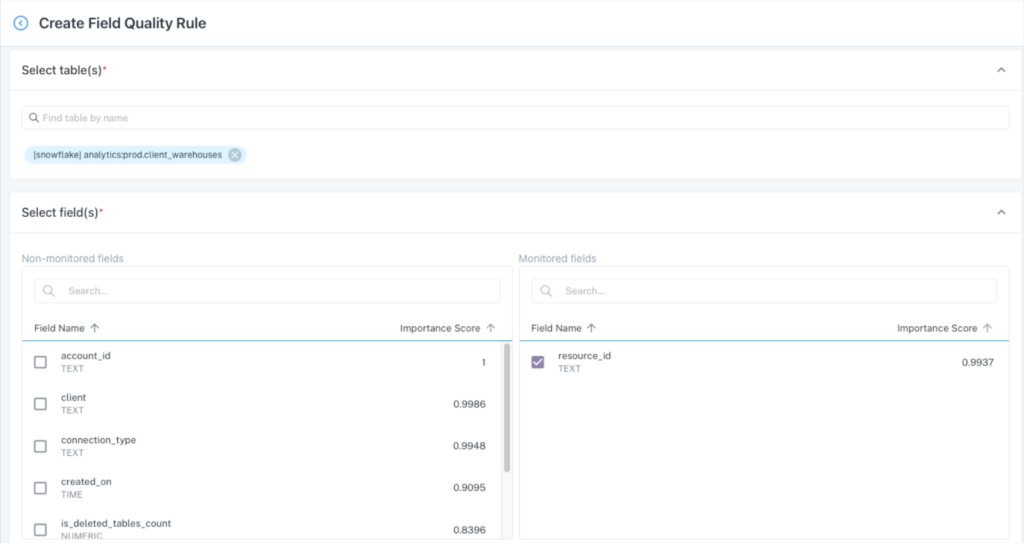
Then select %null metric and the threshold. You’ll notice that it generates a SQL query, but no code is required.
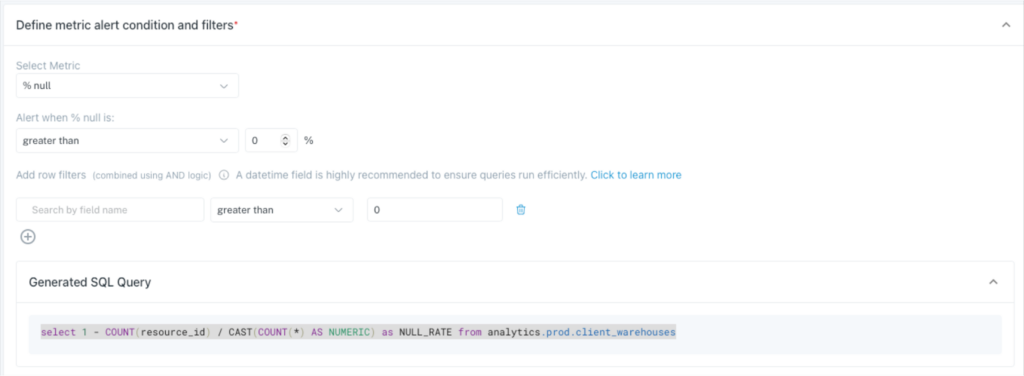
Even better, you can specify how the alerts are routed and to what particular Slack or Teams channel. On top of all that, you would also have broad machine learning coverage across this and all your tables for schema, freshness, volume, and other quality anomalies.
Best practices you should follow for data validation testing
Good data validation requires more than just implementing checks. These five practices will help you build a validation approach that actually works in production and scales with your organization.
Automate data validation tests
Manual validation doesn’t scale and introduces human error at every step. Automated tests run consistently, catch issues faster, and free your team to focus on solving problems rather than finding them. Start with simple scripts for basic checks, then expand to cover more complex validation rules as your confidence grows. The investment in automation pays off within weeks through reduced debugging time and improved data reliability.
Integrate real-time and batch validation
Real-time validation catches errors immediately during data entry or API calls. Batch validation finds patterns and relationships that only emerge across larger datasets. Combining both approaches gives you immediate feedback for users while still catching the subtle issues that slip through individual record checks.
Embed data validation in CI/CD pipelines
Data validation belongs in your deployment pipeline just like unit tests and security scans. Every code push should trigger validation checks on sample data to ensure new features don’t break existing data quality rules. This practice catches schema changes and logic errors before they hit production and corrupt your data. Teams that skip this step inevitably spend weekends cleaning up data messes that could have been prevented.
Maintain clear documentation and standards
Document your validation rules in plain language that both technical and business teams understand. Include examples of valid and invalid data, explain why each rule exists, and specify who to contact when exceptions arise. Good documentation turns validation from a black box into a shared understanding of data quality standards.
Monitor and address alert fatigue
Too many alerts train people to ignore them all. Set thresholds that flag actual problems, not normal variations, and group related issues into single notifications. Create a clear escalation path that routes critical alerts to the right people while batching minor issues for periodic review.
Detecting and validating data drift and statistical anomalies
Data drift happens when your data’s characteristics change over time. Statistical anomalies are the outliers and unexpected patterns that signal something’s wrong. Both can quietly destroy the accuracy of your analytics and lead to terrible business decisions if left unchecked.
Data drift comes in two main flavors. Concept drift occurs when the relationship between your inputs and outputs changes. A credit risk model trained pre-pandemic might fail miserably today because customer payment behavior fundamentally shifted. Distribution drift happens when your input data’s statistical properties change while relationships stay the same. Consider an e-commerce recommendation engine where distribution drift might mean your customer demographics shifted younger, changing average purchase amounts, while concept drift would be those same customers now valuing sustainability over price, completely changing what products they’ll buy.
Several statistical methods can catch these shifts early. Z-scores flag individual data points that fall too many standard deviations from the mean, making sudden spikes in transaction amounts or processing times immediately visible. Chi-square tests compare categorical distributions between time periods, perfect for detecting when customer segments start behaving differently or when product category patterns shift. The Kolmogorov-Smirnov test goes further by comparing entire distributions rather than just means or variances, catching subtle shifts that other tests miss.
Monte Carlo Data provides a sophisticated data + AI observability platform that automatically detects data drift and anomalies. By establishing baseline behaviors through machine learning models trained on historical data, Monte Carlo continuously monitors incoming data for deviations from expected patterns. Rather than running traditional statistical Monte Carlo simulations, it leverages automated statistical analysis and anomaly detection algorithms. For example, a retail forecasting team using Monte Carlo Data would receive immediate alerts if actual sales consistently deviate from historically established trends or expected seasonality, enabling rapid intervention before drift negatively impacts business outcomes.
Proactive data validation with monitors and circuit breakers
Monte Carlo transforms data validation from reactive cleanup to proactive prevention. Instead of discovering data issues during quarterly reviews or after analytics break, teams identify problems as they occur and address them quickly, preventing poor-quality data from moving downstream.
Monte Carlo’s validation monitors continuously track data pipelines, automatically learning typical patterns across numerous metrics such as row counts, null rates, schema consistency, and statistical distributions. When new data deviates significantly from these established baselines, Monte Carlo immediately alerts data teams to potential issues. For example, an abrupt drop in daily transaction volume or a sudden increase in null values triggers rapid notifications, allowing quick response and remediation before downstream analytics are impacted.
Circuit breakers extend this protection by integrating directly into existing pipeline management and orchestration tools. They automatically pause data pipelines when critical quality thresholds are breached, quarantining suspect data and alerting the appropriate teams. This containment strategy prevents problematic data from contaminating production tables or causing downstream analytics failures. As a result, a single problematic data load does not disrupt critical dashboards or compromise weeks of historical analysis.
Monte Carlo’s machine learning capabilities move beyond simple threshold-based monitoring by leveraging sophisticated statistical methods and time-series forecasting to distinguish legitimate variations, such as seasonal trends, from true anomalies. Its algorithms detect subtle but important issues like schema drift, gradual declines in data quality, or unexpected statistical changes that simpler rule-based methods often miss. Teams gain adaptive monitoring without needing to manually configure and adjust thresholds as the business evolves.
When an anomaly occurs, Monte Carlo accelerates resolution by providing detailed root-cause analysis and comprehensive lineage tracing. The platform visually identifies the precise source of the problem, affected upstream tables, and anticipated downstream impacts. Data teams can quickly determine whether an issue originated from source system changes, transformation errors, or unexpected business shifts, significantly reducing troubleshooting time from hours to minutes.
Data validation testing limitations and mistakes
If you are doing data validation testing wrong, it can do more harm than good. Your team will be spinning their wheels without creating any tangible value for the business. Here are some limitations to data validation testing and common mistakes to avoid.
Uneven application
We all know we should brush our teeth three times a day, but are you confident everyone on your team is doing it every day? Data validation testing is a similar habit.
Everyone on the data team knows they should be doing it, and have the best intentions of doing it, but pressing deadlines and ad hoc requests get in the way.
Most of the data teams we interact with have a very uneven data validation process unless engineering leadership has repeatedly emphasized it as a priority over other aspects of the job. Even then, new tables get created without validation rules applied immediately. Just like data documentation is rarely perfect, so too are manual data testing strategies.
Little understanding of the root cause
The table that experienced the anomaly or data quality issue rarely holds the necessary context to adequately determine the cause of the problem. The data ecosystem is just too interdependent for that.
Unfortunately, root cause analysis is the hard part. Our research shows data teams spend an average of 15 hours or more trying to solve data issues once they’ve been identified.
To accelerate troubleshooting, data teams typically need to move upstream and leverage tools provided by data observability platforms such as the Troubleshooting Agent featured below. Otherwise you won’t have context to determine if the data quality incident was caused by a system, code, or data issue (or where in the pipeline it might lie).
Alert fatigue
Data can break in a near infinite amount of ways. When teams experience a data quality issue that wasn’t caught by a data validation test the most common response is to layer on more tests.
As a result, data teams have alarm bells ringing all day without any context on the impact that can help them triage. Is it an issue that will find its way to a critical machine learning application or a dashboard checked once a quarter? Without data lineage there is no way to tell.
Business logic or key metrics go unvalidated
It’s easy for data engineers to understand that a primary key column should never be NULL, but it’s much harder to set non-absolute thresholds on key business metrics without input from data analysts, analytical engineers, or other data consumers. As a result, this step is frequently overlooked.
Validate only one part of the pipeline
Data validation tests are best deployed on your most important tables, but that doesn’t necessarily mean your most curated tables in your gold layer. It can be especially important to test or profile data as it first lands raw in your environment, especially if it is coming from third parties. Each step of the transformation process for critical data products should be evaluated to see if a data validation test is appropriate.
No coverage for unknown unknowns
In our experience, about 80% of data quality issues occur in ways that no one anticipated. You can’t anticipate all the ways data can break, and if you could it is incredibly difficult to scale across all of your pipelines. Monitoring for these issues with machine learning can help fill those coverage gaps.
“We had a lot of dbt tests. We had a decent number of other checks that we would run, whether they were manual or automated, but there was always this lingering feeling in the back of my mind that some data pipelines were probably broken somewhere in some way, but I just didn’t have a test written for it,” said Nick Johnson, VP of Data, IT, and Security at Dr. Squatch.
The right tool for the right job
Once you’ve validated your data, the journey isn’t over. Data can become corrupted, go missing, or become outdated at any time as it moves throughout your systems.
Data validation testing, though vital, only goes so far. Some of the downsides include 1) you have to anticipate all the ways things could go wrong, 2) you have to understand the rules to apply them (does a data engineer know that a currency conversion column can’t be negative?), and 3) try to scale over a million items.
Given these challenges, it’s clear that something more encompassing, something that can keep an eye on the entire lifecycle of the data is needed. That’s where data observability comes in.
A data observability platform like Monte Carlo keeps an eye on your data at all times, providing automated monitoring across every production table and down to your most critical fields.
The platform uses machine learning to automatically determine what to monitor and the thresholds to set based on your historical data incidents and incidents across thousands of customers. And as soon as a data incident or anomaly is detected, Monte Carlo notifies data owners to quickly triage and resolve incidents before they affect the business.
This isn’t to say your team should never conduct data validation testing, just that it is an activity best reserved to set alerts on the most understood, absolute thresholds for your most critical data products. For everything else, there’s data observability.
Learn more about how data observability can supplement your testing. Set up a time to talk to us using the form below.
Our promise: we will show you the product.


